Client review status
Client review marks a status as the step where the client accepts or rejects the work. FeatValue then sends the review mail and records every decision.
What the client review status is for
Agencies use this toggle so a status is not just a label. When a task enters that status, the client gets the ready-for-review mail. When the client accepts or rejects the work, FeatValue records the outcome. Rejected reviews with a reason appear under Reviews.
- Ask the client to accept work in the portal
- Show the review note on the task
- Keep a record of rejected reviews for reporting
Where to find it
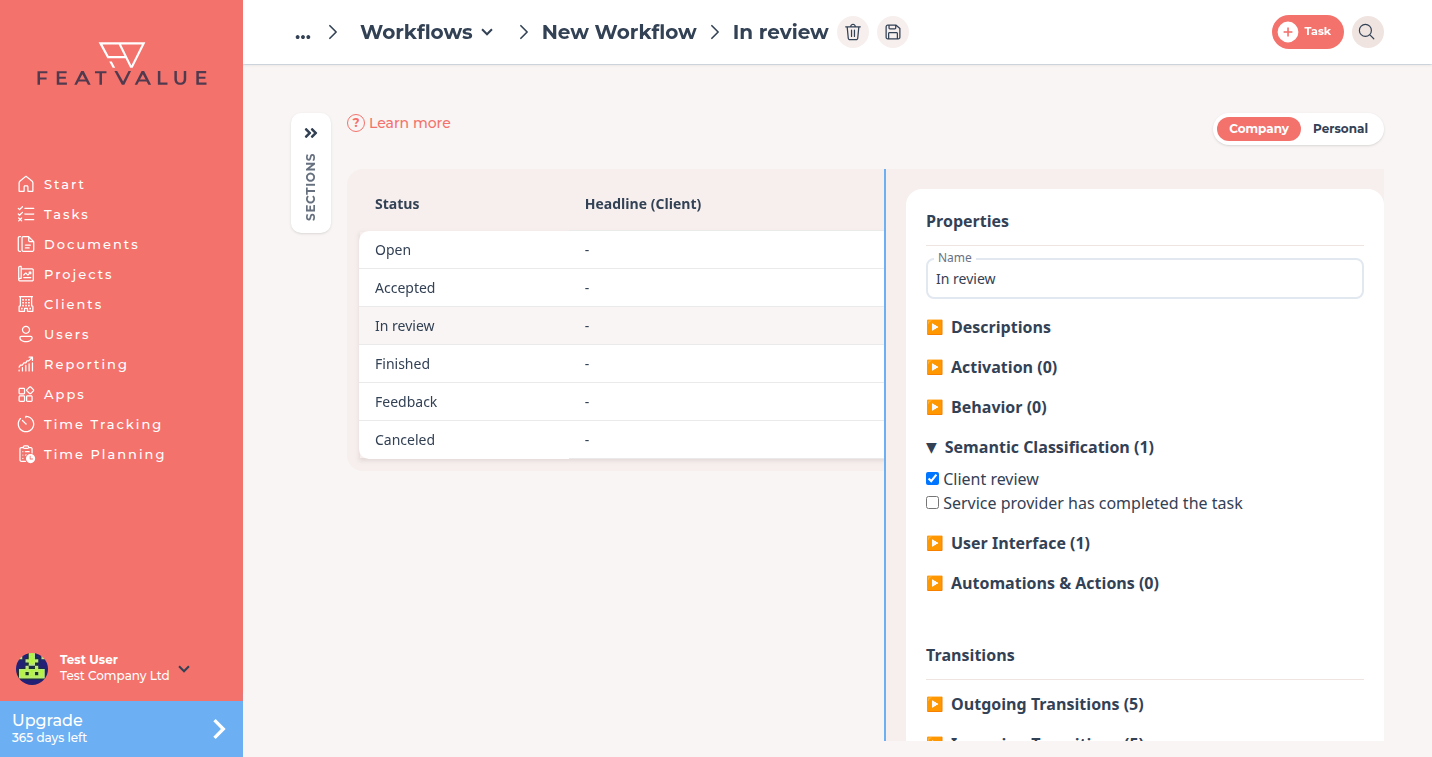
Open a workflow you own under Workflows. Select the review status (on the default workflow this is In review). Expand Semantic Classification and tick Client review. See Workflows overview.
How it works
-
Clone the default workflow
The public default is read-only. Click New Workflow, choose the default as Template and click Create. -
Turn on Client review
Select the status that should be the review step. Under Semantic Classification enable Client review. -
Show the review note
Under User Interface enable Show review note if the task should display the acceptance note. On the default workflow, In review already has both toggles. -
Save and assign
Click Save. Assign the workflow to a premium project. When someone runs Start review, FeatValue sends the review mail. How clients accept: Review and acceptance.
Effect on mail and reporting
Entering a status that has Client review (or the default In review value) notifies the project owner’s users with the ready-for-review event. The mail uses the task name, project name and a link to the task.
When the client decides on the task, FeatValue records the outcome: accepted or rejected. A rejection also stores the reason, and the task shows up under Reviews in Reporting.
Permissions and plans
You change toggles only on a workflow your company owns. Individual workflows need Starter, Pro or Enterprise. The default already has Client review on In review, so a clone keeps that setup until you change it.
Troubleshooting
The client never gets a review mail
Confirm the status has Client review, the transition into that status is allowed for the person who moved the task, and the recipient is a user on the project.
Reviews stay empty
Reporting lists only rejected reviews with a reason. Accepted tasks do not appear on that list. See Reviews.
Your question has not been answered?
We will be happy to help you. You can send us an e-mail or arrange a video conference: