Reviews
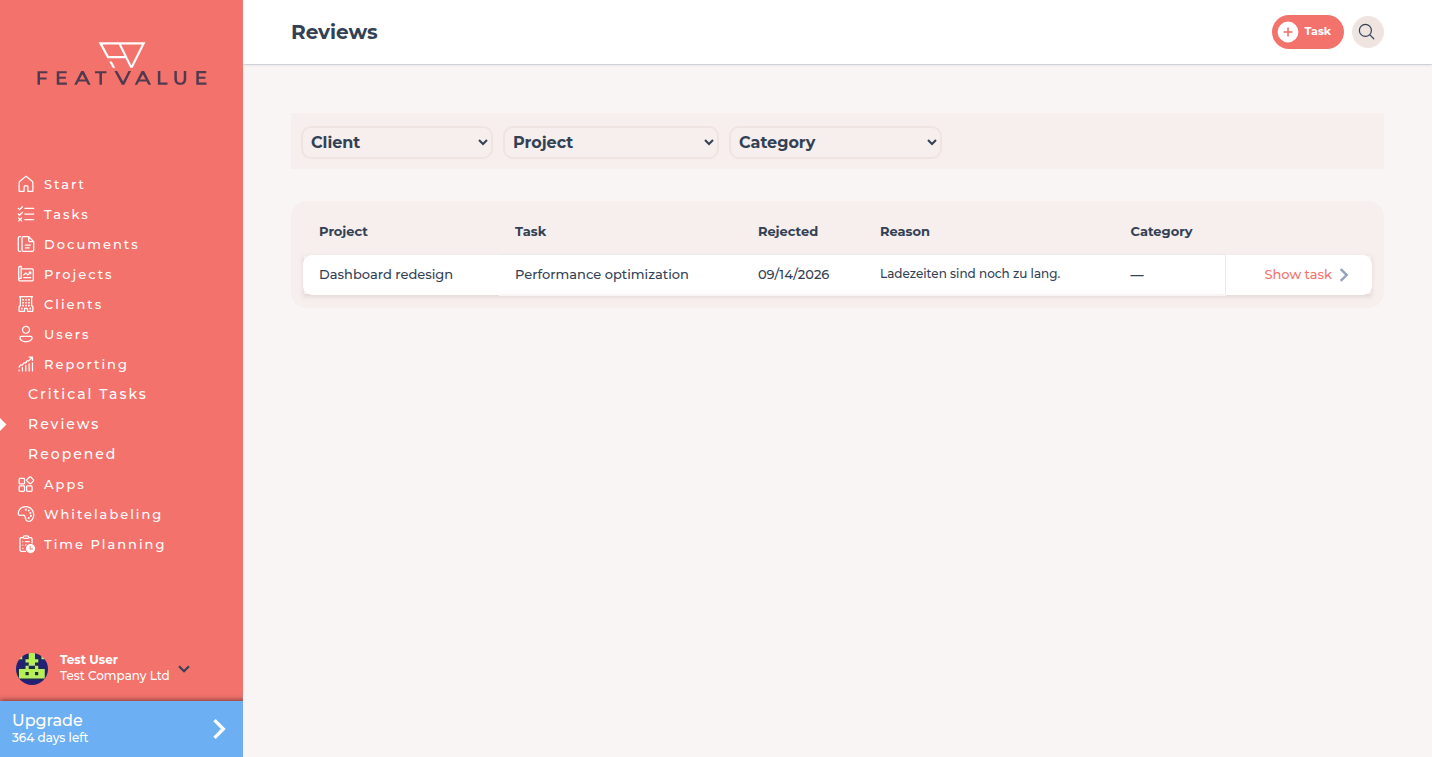
Reviews in Reporting is a list of failed reviews that include a reason. You use it after a client rejected work.
What the reviews list is for
When a task is in a Client review status and the client rejects acceptance criteria, FeatValue stores a review with status rejected and a reason. This page lists those rows so you can categorise them. How the toggle works: Client review status.
- See failed reviews with their reason
- Assign a review category
- Open the related task
Where to find it
In the sidebar open Reporting → Reviews. The page title is Reviews. See Reporting overview.
How it works
-
Open the list
The grid shows the project, the task name, the date, the reason and the review category. -
Filter
Use Client, Project and Category when you only want one company or one category. -
Set a category
Click the category cell. The dialog asks To which category does this review belong? Values include Something is missing, Wrong extension, Misunderstanding, Error and Other. Click Save. -
Open the task
Use the row action to open the task and continue the review. See Review and acceptance.
What appears here
Only failed reviews with a reason are listed. Successful accepts do not appear. After a reopen, follow-up work is on Reopened tasks.
Permissions and plans
The list sits under Reporting and needs Pro or Enterprise. You see reviews for tasks in projects you serve.
Troubleshooting
The list is empty after a rejection
The task must have been in a status with Client review, and the rejection must have stored a reason. Accepted reviews never show here.
Your question has not been answered?
We will be happy to help you. You can send us an e-mail or arrange a video conference: