Roles and access
Every project has one owner company and can have co-owners, service providers, and companies with read access. The role decides what people may change.
What roles are for
Roles keep client access and provider access apart. The owner always has full access. Providers only get extra rights on premium projects.
Where to find it
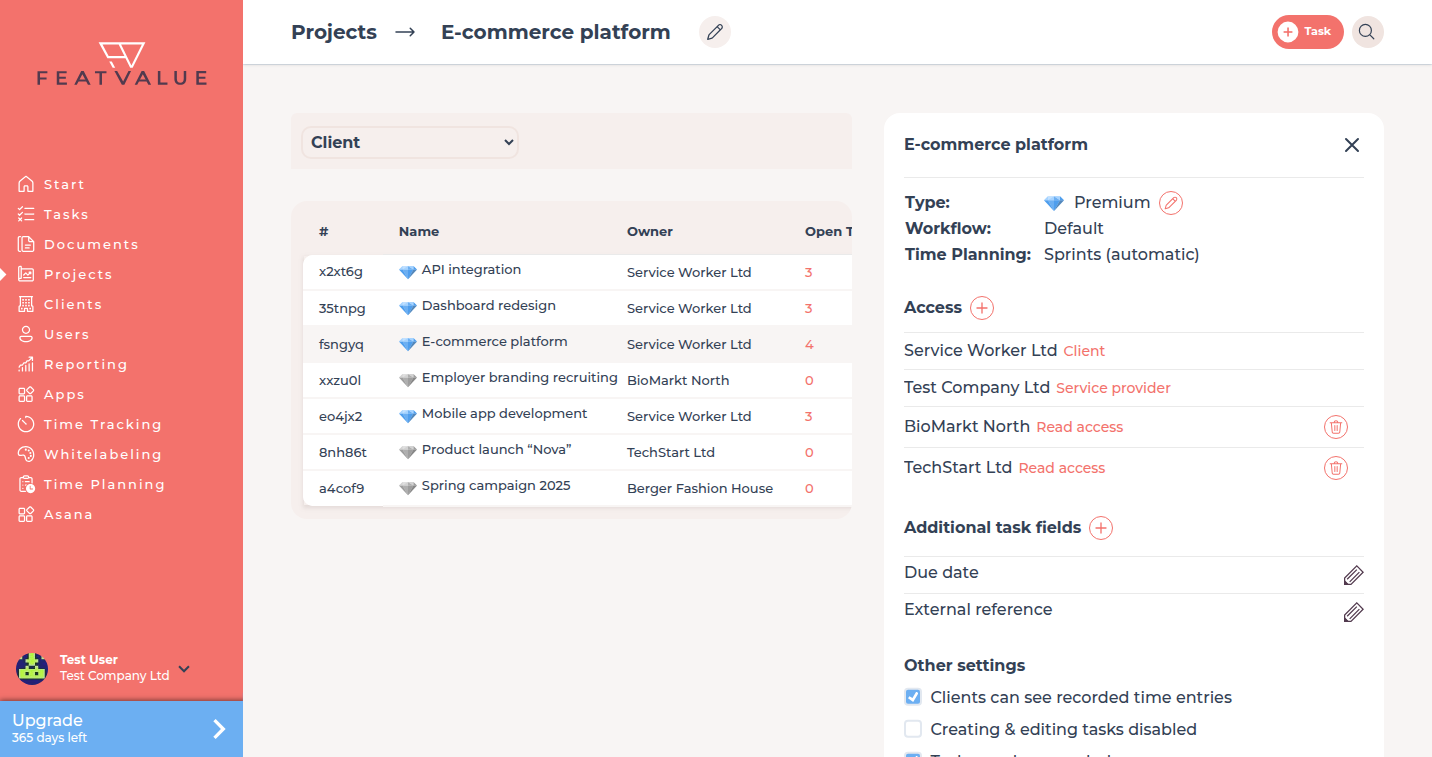
Open a project from Projects. Under Access you see the client, service providers, co-owners, and read access. Plus lets you choose what to add. Plus always shows all three options. What is not allowed stays visible but is disabled. Only the service provider that created the project can add co-owners, and that needs the Pro setting Enable project co-owners.
How it works
-
See who owns the project
The owner is the company stored as owner of the project. On a client project that is the client. On an own project that is your agency. The owner has full access. -
Add a service provider
Under Access, use Plus to add a Service provider. That company then works on the project next to the owner. -
Optionally add a co-owner
A co-owner has the same access as the client. Only the service provider that created the project can add one. The setting Enable project co-owners is a Pro option. If the option is disabled, the title shows the reason. -
Set provider rights on premium projects
On a premium project you can grant a provider single permissions: create, edit, cancel, status, comment, review, invite a provider, and manage permissions. Without premium those toggles are not available. -
Optionally grant read access
Under Access, choose Read access from Plus. You attach an existing client company. It sees the project and its tasks but cannot change them. You can exclude individual users of that company from the project. Time planning stays unchanged. Without premium, read access stays in the list with a diamond. Next then becomes Upgrade.
Open invitation
While the invitation is still open, Access shows a clock icon. Send again sends the same invitation once more.
Roles
| Role | Who it is | Access |
|---|---|---|
| Owner | The owner company of the project | Full access |
| Co-owner | An extra company with client-level access | Same as the client. Only the creating service provider. Needs Enable project co-owners Pro |
| Service provider | A company assigned to the project | Works on the project. Granular permissions only on premium projects |
| Read access | An existing client company on the project | Read only. Premium projects only. No second login, no project-wide read-only lock |
How you create the owner in the first place is in Creating projects. What clients see in the app is in Portal access.
First external service provider
When you assign the first service provider that is not your own company, FeatValue sets the project's time-planning mode to none. Set the planning mode before you add that provider, or change it later in Project settings.
Permissions and plans
Co-owners need a Pro plan (Pro or Enterprise). Granular provider permissions and read access need a premium project. On a non-premium project the provider works without those extra toggles. If only the plan is missing and you created the project, co-owners and read access stay visible under Plus, with a diamond. Next then becomes Upgrade. If you did not create the project, co-owners stay disabled, without a diamond. The title shows the reason.
Troubleshooting
The client cannot change tasks
Check the project setting Creating & editing tasks disabled. Also check whether the person is a contact of the owner company.
I cannot set provider permissions
Upgrade the project to premium first. Those toggles exist only on premium projects.
Co-owner is disabled
Only the service provider that created the project can add co-owners. Hover the option. The title shows the reason.
Your question has not been answered?
We will be happy to help you. You can send us an e-mail or arrange a video conference: