Overview
Projects group the work your agency shares with clients and service providers. Each project has an owner (usually the client), optional providers and a count of open tasks.
What projects are for
A project holds the tasks, reviews, documents and planning for one piece of work. You use it for client work and for work your own company owns.
- See every project, its owner and how many tasks are still open
- Open a project to work on tasks, roles and settings
- Keep client work separate from projects your agency owns
Where to find it
Click Projects in the left sidebar.
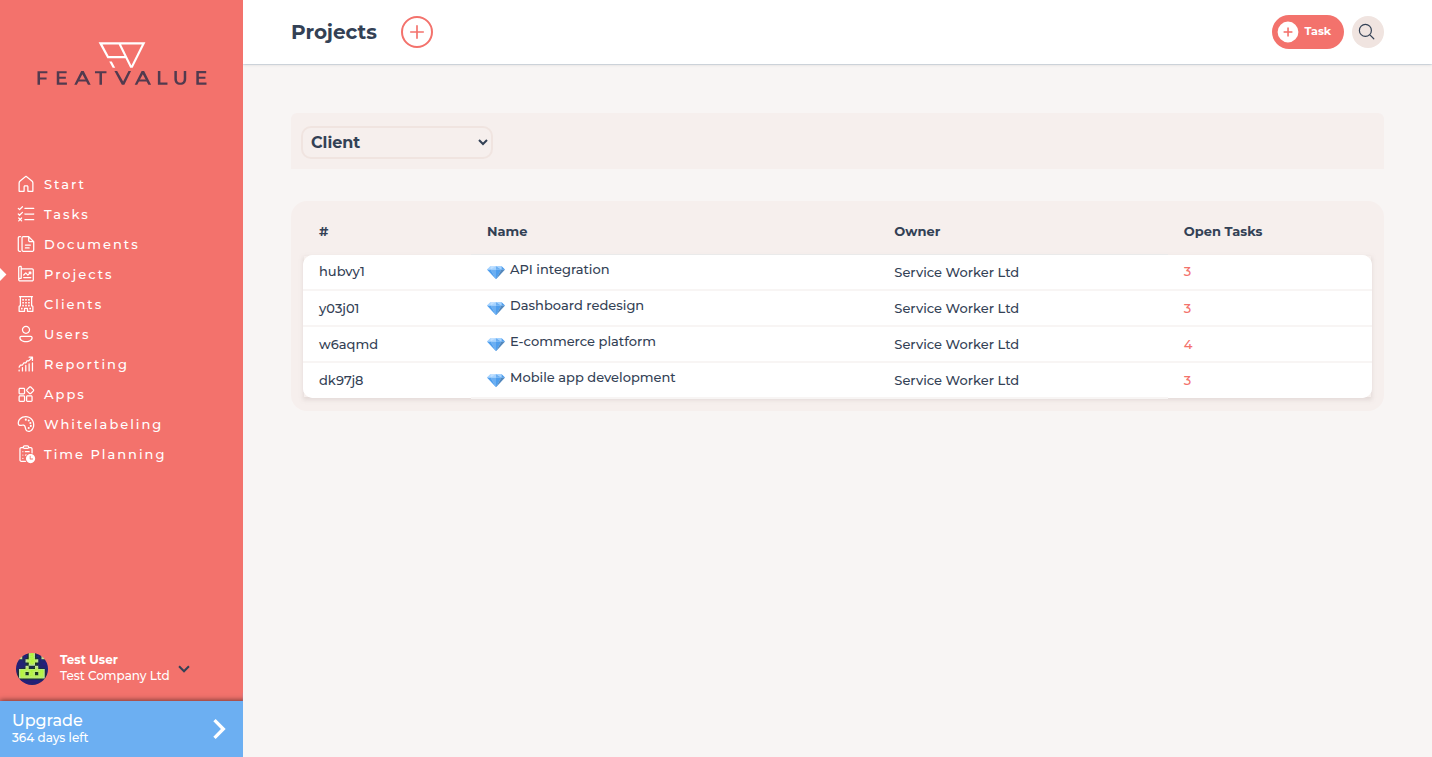
How it works
-
Open the list
The table shows Name, Owner and Open tasks. A diamond next to a name marks a premium project. -
Filter by client
Use the Client filter above the table when you only want projects for one client. -
Create a project
Click the plus next to the title, labelled Create project. See Creating projects. -
Open a project
Click a row to work in that project. Roles, the side-panel settings and the project documents folder live on the other project pages.
What the list shows
| Column | Meaning |
|---|---|
| Name | The project title. A diamond means the project is premium. |
| Owner | The company that owns the project — usually the client (your agency on an own project). |
| Open tasks | How many tasks in this project are still open. |
Permissions and plans
Who may open a project follows roles and access. All plans allow unlimited base projects. Premium slots depend on the plan – see Premium projects.
Complete setup includes the item Create a project. It closes when you own or serve at least one project.
Troubleshooting
A project is missing from the list
Check the Client filter. You only see projects your company owns or serves as a service provider.
Your question has not been answered?
We will be happy to help you. You can send us an e-mail or arrange a video conference: