Budgeting
Budgeting manages hour allowances: you record how many hours a client agreed for a period and see how much of that is used. It is always about hours, not money — FeatValue does not write invoices.
What it is for
Use Budgeting when automatic sprint planning must stay inside the agreed hours. An allowance can cover one period once or repeat, for example 80 hours a month. Budget Tasks additionally shows which tasks used those hours.
Capacity per client and sprint: Capacity planning. Taking hours back out: Estimates and budget cuts.
Where to find it
Under Time Planning open Budgeting or Budget Tasks. Both appear when automatic sprints are in use.
How it works
-
Store the client budget on the client
Open the client and enter the period (From / To) and the Hours agreed for that period — that is the allowance. Save the client. -
Open Budgeting
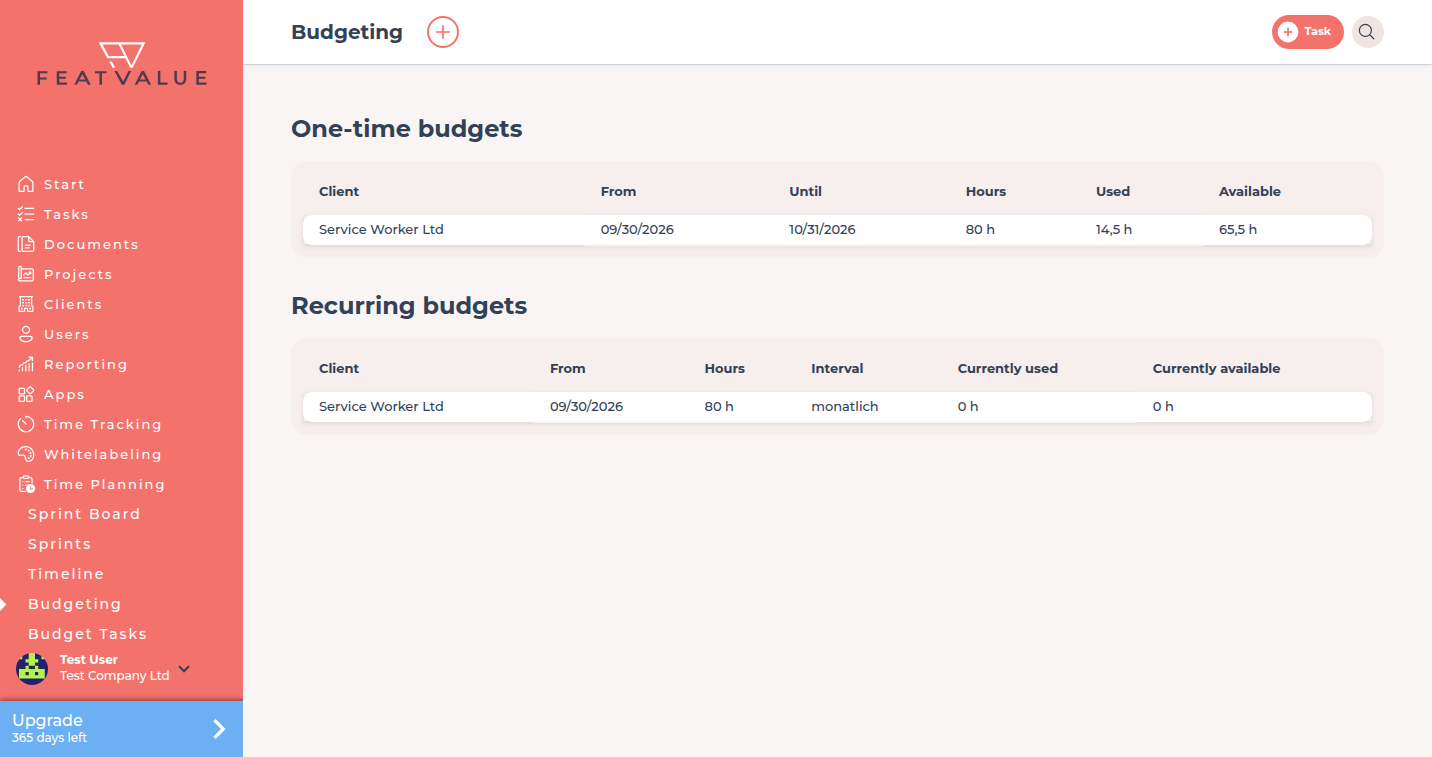
Click Time Planning → Budgeting. The page lists one-time and recurring allowances per client with Hours, Used and Available (on recurring allowances Currently used and Currently available). -
Check what tasks used
Click Budget Tasks. The list shows tasks that already have time entries on automatic-sprint projects. You take single hours back out of the budget here — see Estimates and budget cuts.
Options
| Item | What it does |
|---|---|
| From / To | Period the hour allowance covers. Stored on the client. |
| Hours | The hours agreed for that period. Stored on the client and listed as Hours. |
| Budgeting | Allowances per client with used and available hours. |
| Budget Tasks | Tasks you can cut under Time Planning. |
Permissions and plans
Budgeting needs a premium user and Sprints (automatic) on the projects you budget. Planned hours on a task come mainly from the story points on the task — FeatValue converts them into hours in a self-learning way: the more finished tasks with the same point value it has seen, the more accurate the estimate. Details: Estimates and budget cuts.
Troubleshooting
Budgeting or Budget tasks is missing
Automatic sprints are off, or your company does not show the automatic sprint index. Set a premium project to Sprints (automatic).
Budget tasks is empty
The list only includes tasks that already have time entries on automatic-sprint projects.
The hours on the client do not match the sprint
The hour allowance covers a whole period, while capacity covers a single sprint. Those are two different values. See Capacity planning.
Your question has not been answered?
We will be happy to help you. You can send us an e-mail or arrange a video conference: