Critical tasks
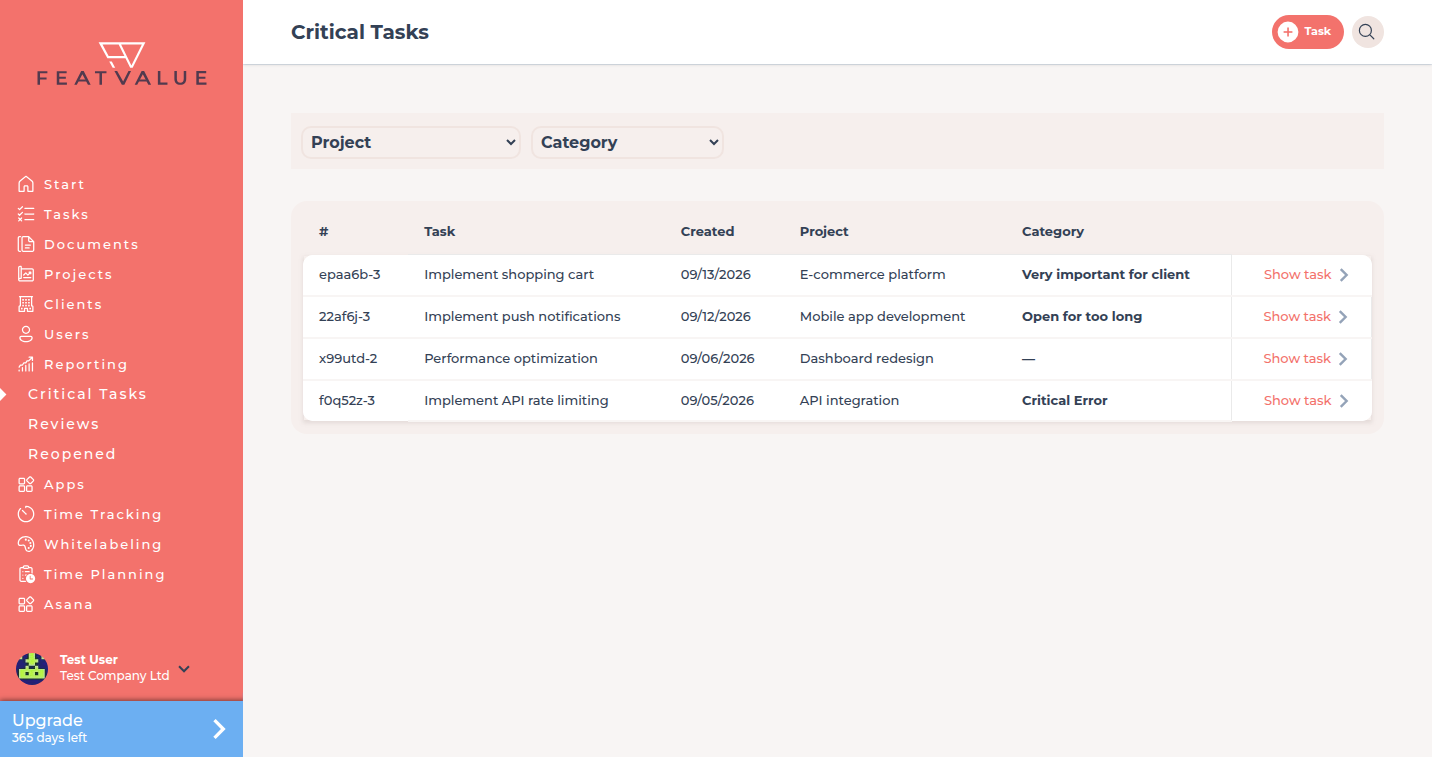
Critical Tasks is a list of tasks whose priority is Highest. You use it to categorise them and open the task.
What critical tasks are for
Highest priority is the signal that a task needs attention now. This page collects those tasks across your projects so you do not hunt for them on the board.
- See every task with priority Highest
- Assign a category such as Critical Error or Very important for client
- Open the task from the row
Where to find it
In the sidebar open Reporting → Critical Tasks. See Reporting overview.
How it works
-
Open the list
The grid shows the task token, a shortened name, the created date, the project and the category. -
Filter
Use the scopes for Project and Category when you only want one client project or one category. -
Set a category
Click the category cell. The dialog asks To which category does this task belong? Choose a value and click Save. -
Open the task
Use the row action to open the task. How priority is set: Creating and editing tasks.
What counts as critical
FeatValue includes a task when its priority is Highest. Other priorities (High, Medium, Low, Lowest) do not appear here.
Permissions and plans
The list sits under Reporting and needs Pro or Enterprise. You see tasks from projects you can access.
Troubleshooting
A task I marked as urgent is missing
Check the priority on the task. Only Highest is critical. Also check the Project filter.
Your question has not been answered?
We will be happy to help you. You can send us an e-mail or arrange a video conference: