Menus and custom items
The Menu and Miscellaneous tabs decide what clients and service workers see, and a few portal options.
What menus and custom items are for
Built-in items can be on or off per audience. A New menu item adds a name and URL. Placeholders {client:field_name} work for clients only.
Where to find it
Open Settings › Company › White labeling. Switch to the Menu or Miscellaneous tab. See Whitelabeling.
How it works
-
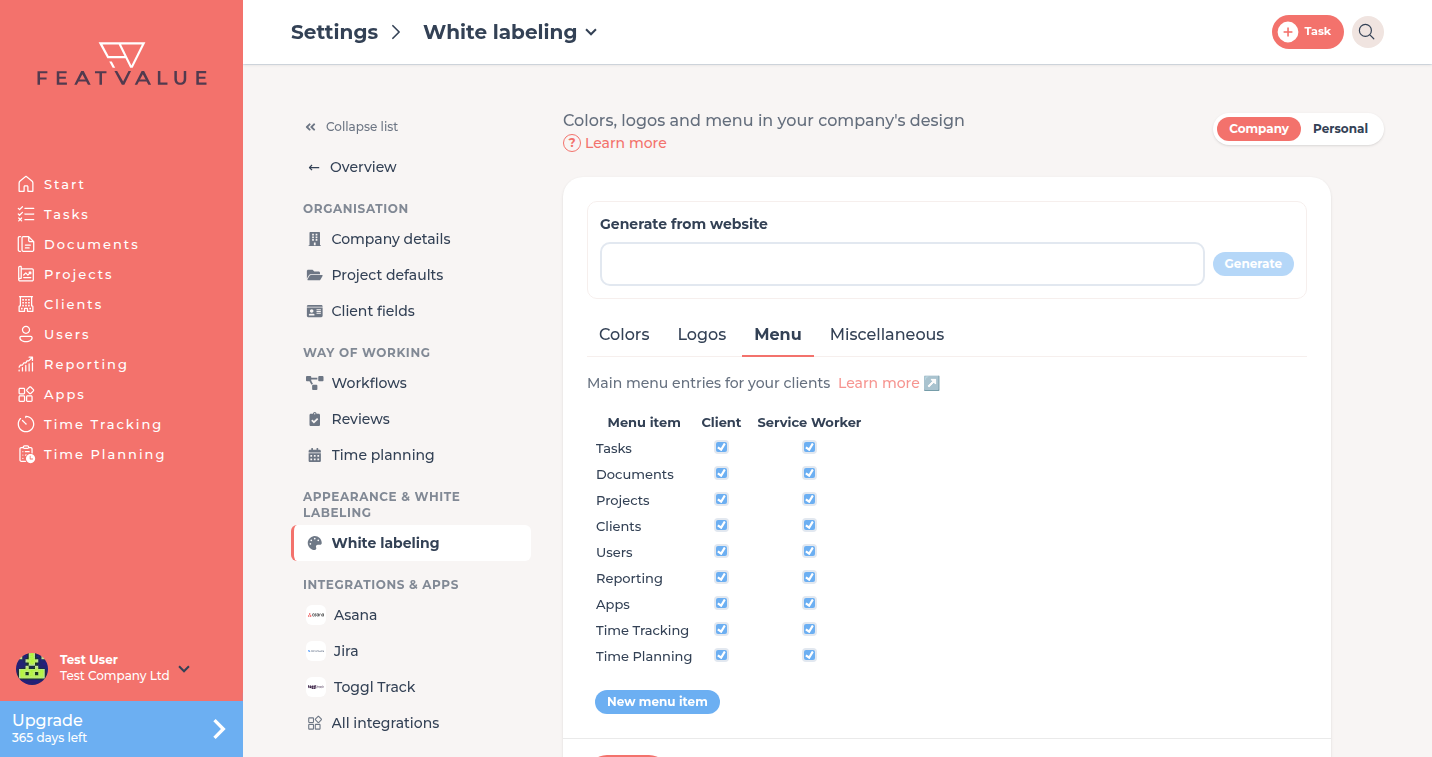
Tick built-in items
The table columns are Menu item, Client and Service Worker. Tick who should see each item. -
Add a New menu item
Click New menu item. Enter Name and URL. Confirm with Insert item. Optionally pick an icon from the list under Menu item icon. To upload your own SVG, use the + at the end of the icon grid (Add icon, max. 100 KB). Its color is adjusted to the menu automatically. -
Use a client placeholder if needed
If you have client fields, the dialog lists Available client fields. Insert{client:field_name}in name or URL. Missing values hide the item. A placeholder item cannot be shown to the agency column. -
Set Miscellaneous
Optionally tick Clients can create projects. Choose Button rounding and Task URL in notification emails (for embedding on your website, WordPress). Set Sender name. Then click Save.
How you define the fields: Client fields.
Options
| Control | What it does |
|---|---|
| Client / Service Worker | Who sees that built-in or custom item |
| New menu item | Name plus URL. Edit or delete later in the table |
| Menu item icon | An icon from the list or your own SVG via + (Add icon, max. 100 KB). Without a choice, the default icon is shown. The icon is displayed in a single color matching the menu. |
| Clients can create projects | Lets client users create projects when the option is on |
| Button rounding | None, Small or Full |
| Task URL in notification emails | Default FeatValue (default). For the website embed (WordPress), pick your site URL so links in emails open there. See Embed on your website. |
| Sender name | Defaults to the agency name. Used for emails to clients who use this theme. Emails to the agency stay from FeatValue. |
The placeholder hint is: Use these placeholders in the name and URL. Missing values will hide the menu item.
Permissions and plans
Menu settings need Starter or higher. Starter Client Fields for placeholders needs Pro. See Client fields.
Troubleshooting
The custom item does not appear for a client
Tick the Client column. If you used {client:field_name}, fill that field on the client.
I cannot tick Service Worker on a custom item
A name or URL with a client placeholder is client-only. Remove the placeholder to enable the agency column.
My own SVG is not accepted
The message The file is not a valid SVG or is too large. appears for files over 100 KB or without valid SVG content. Upload an .svg file made of simple shapes. FeatValue removes embedded images, text and scripts when you upload.
Your question has not been answered?
We will be happy to help you. You can send us an e-mail or arrange a video conference: