Generate a theme from a website
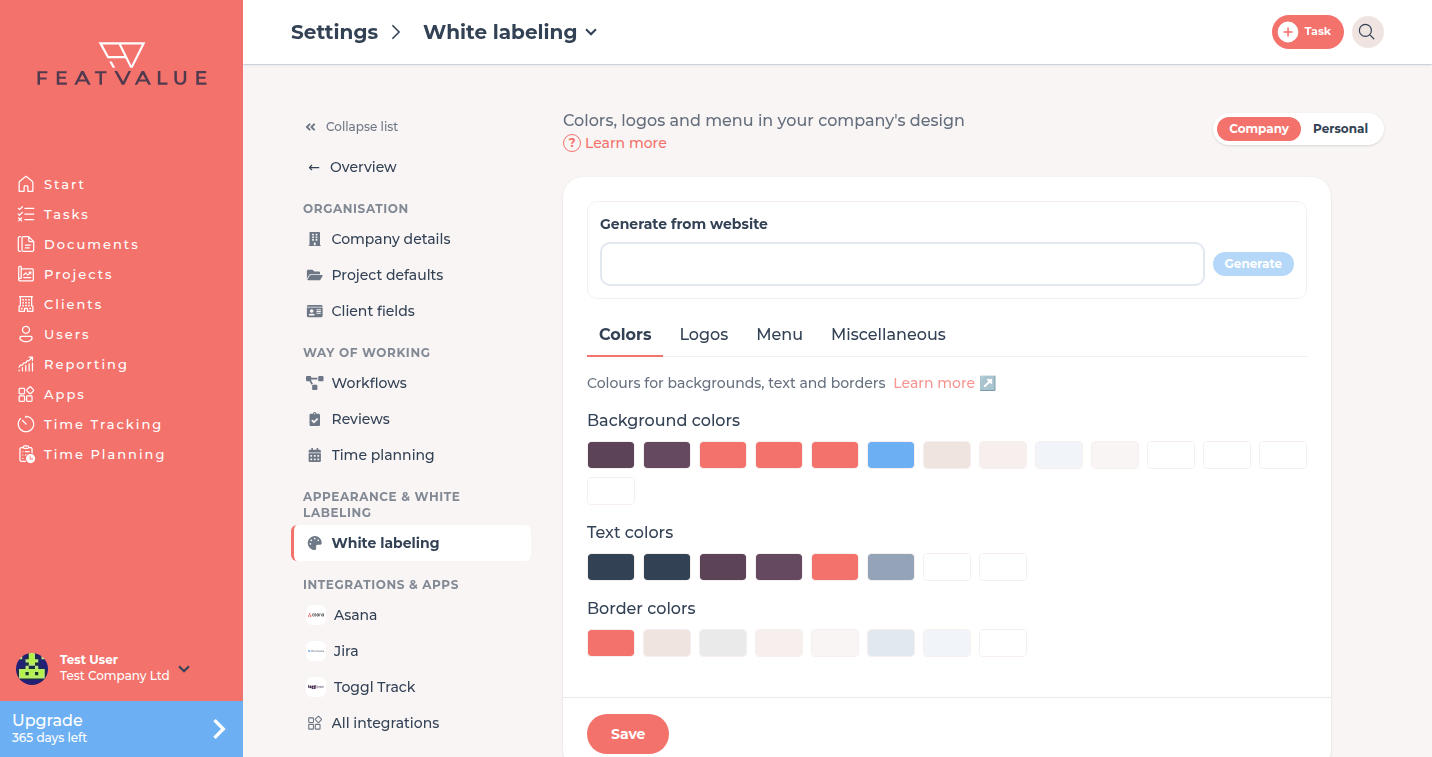
Use Generate from website to copy colors and logos from your site into Whitelabeling.
Where to find it
Open Settings › Company › White labeling. The block sits at the top of the page, above the tabs. See Whitelabeling.
How it works
-
Enter the website
Type the address in the field. The placeholder ishttps://example.com. -
Click Generate
Click Generate. FeatValue shows Extracting design from your website … and short phase texts. -
Review and save
Check Colors and Logos. Click Save. Success: Design was applied from your website.
How to fine-tune the result: Logo and colors.
Options
| Control | What it does |
|---|---|
| Website field | Public URL. Placeholder https://example.com |
| Generate | Starts the extract. Disabled while empty or while a run is in progress |
What is detected
- Colors for sidebar, surfaces, buttons and text. FeatValue checks the contrast, so text stays readable and bright brand colors are not used as work surfaces.
- Logo: the logo from the header of your site. If there is only a text logo, it is used as an image.
- Fonts for body text, headings and controls. Licensed fonts are replaced by a similar free font. You can change them on the Fonts tab.
Permissions and plans
Same as the other tabs: Starter or higher. Starter
Troubleshooting
Generate stays disabled
Enter a URL first. Wait if a run is already in progress.
FeatValue cannot read the site
You may see Please enter a valid website. or Could not generate design from website. Check the address and that the site is reachable.
Your question has not been answered?
We will be happy to help you. You can send us an e-mail or arrange a video conference: