Inviting contacts
Before a client can use the portal, at least one person on the client side needs an invitation. You send the first ones; after that the client can add more people themselves.
What inviting contacts is for
The person signs in to FeatValue and sees the client interface. You invite as many team members as that company needs. After that, the client can add further people themselves.
Where to find it
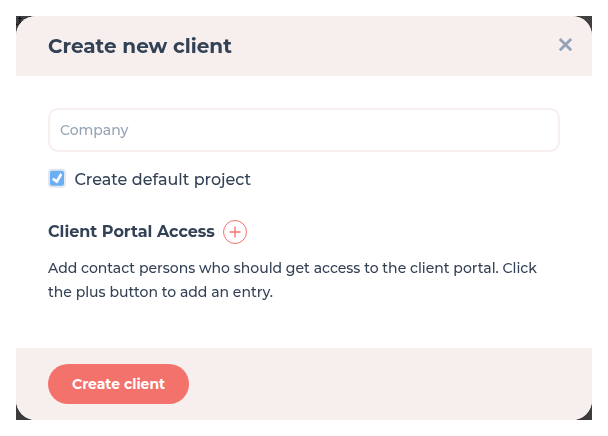
Add the first people on Create client under Client Portal Access (name and e-mail). Invite more people from the client details: open the client in the list and click plus next to Users.
How it works
-
Add people while creating the client
On Create client fill Client Portal Access with name and e-mail. FeatValue invites those people to the new company. -
Invite further team members later
Open the company from your client list. Next to Users click plus, enter the person and send the invite. -
Let them finish login
The person follows the invitation link and sets a password the first time. See Registration and login.
What they see after login is in Portal access. How the company record is created is in Clients.
Options
| Place | What you enter |
|---|---|
| Client Portal Access on create | Name and e-mail for each first person |
| Plus next to Users in the client details | Further team members of an existing client company |
Permissions and plans
All plans allow unlimited team members. Inviting a person does not consume a paid seat.
Troubleshooting
The invite does not arrive
Ask the person to check spam. In the client details, click Send again next to the person while the invitation is still open. The person must use the invitation link, not the public register page.
Your question has not been answered?
We will be happy to help you. You can send us an e-mail or arrange a video conference: